Working on tasks in Jira
Codee works in Jira like a teammate does. It watches your project for issues in a status it handles, picks them up, does the work, and moves the issue to the next status.
To hand an issue to Codee, move it into a status Codee watches. What marks an issue as
the AI's is that status together with the other two filters: the issue type, through the
types mapped to Codee's work items, and a custom JQL if you set one. This tutorial uses
dedicated AI statuses that nothing else in your workflow touches, which is the simplest
version of that agreement. If you would rather reuse the statuses you already have, let the
work item type or the JQL be what separates Codee's issues from everyone else's.
This tutorial shows how to create those statuses and how a story and a task move through them.
Which issues Codee picks up
Codee polls the project you set under Settings → Tasks provider → Project key (see Configuration) for issues that are of one of the types listed under Settings → Tasks provider → Work items and in one of the statuses its skills trigger on.
You do not have to create anything in Jira for that. Codee has work items of its own, and
that section maps each of them to the issue types your project already uses. story and
task are always there, mapped to Jira's Story and Task by default:
| Codee work item | Jira issue type |
|---|---|
story | Story |
task | Task |
To change either one, click Load types from provider, which lists the issue types of the
configured project, and pick the right one. A row can name several types, so if your team
works bugs the same way it works tasks, map task to both Task and Bug and every task
skill will pick up either. If a list of type names is not enough, for example when a Bug
is Codee's only if it has a certain label, switch the row to JQL (Advanced) and write
the condition yourself.

Add work item adds a work item of your own, for example a bug row mapped to Bug. It
is worked by skills that declare x-codee-issue-type: bug and gets its own graph on the
Workflow page. Add a work item when it needs skills of its own; add another type to an
existing row when it does not. See Configuration.
Children of a mapped type are not picked up on their own: Codee works on them inside their
parent's run, so a Task whose parent is a Story — or another Task — is skipped on
purpose. Only the types on a row do that; a row switched to JQL (Advanced) does not,
because nothing in a parent says whether the condition claims it.
AI statuses have to be Codee's aloneAny issue of a mapped type that lands in one of these statuses gets worked on. Do not reuse
an existing status your team already moves issues through, and do not add an AI status to
a workflow Codee should not be driving.
Set up the Codee account
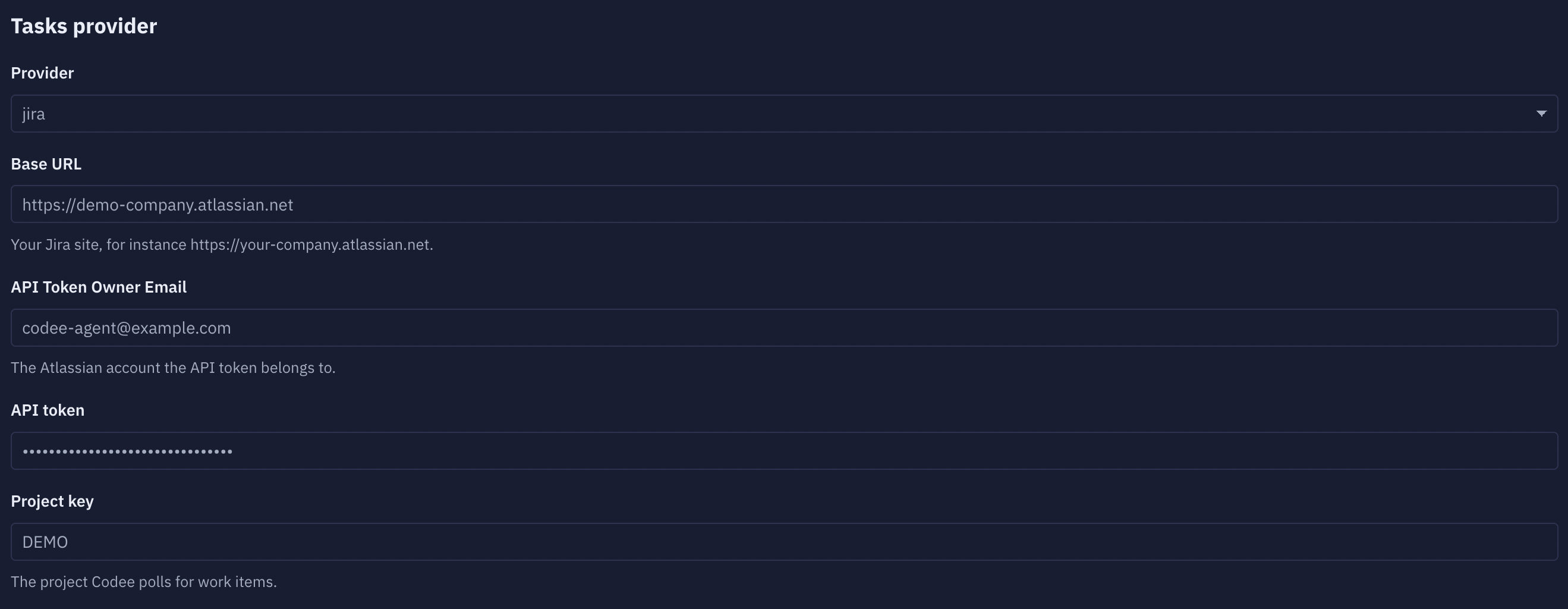
Codee authenticates as a Jira user, and every comment, status change and pull request it makes is attributed to that user. Create a separate one for it rather than reusing a person's account, so a glance at an issue's history tells you what the AI did and what a person did. Its email and API token are what you paste into Settings → Tasks provider.
On Jira Cloud:
- Pick an email address for Codee, for example
codee@yourcompany.com. It has to be a real mailbox you can receive the invite at. - Open the Atlassian admin console at admin.atlassian.com, go to your organization, then Directory → Users → Invite users. Enter the email and give it access to Jira.
- Accept the invite from that mailbox and finish creating the account.
- Add the account to your project. In a company-managed project that is Project settings → People → Add people, in a team-managed project Project settings → Access → Add people.
- Give it a role that includes the Transition Issues, Add Comments and Edit Issues permissions. Company-managed projects list these under Project settings → Permissions. Assignable User is worth adding too, so a person can hand an issue to it by name, but Codee does not need it to work.
- Log in as Codee and create an API token at id.atlassian.com/manage-profile/security/api-tokens, using Create API token. This is the token you paste into Settings → Tasks provider → API token, alongside the same email under API Token Owner Email.
Then use Verify connection on the settings page to check the account can reach the project and act on an issue in it.
Creating statuses for Codee in Jira
Why separate statuses
In this tutorial, status is the only thing that says an issue is Codee's, and what Codee should do with it now.
Codee polls Jira for issues whose status matches a skill's x-codee-issue-status trigger.
The AI statuses exist so that anyone looking at the board can see at a glance which
stories and tasks are in the AI workflow that Codee runs, and which stage of it they are
at.
Which statuses to create
The statuses below, and what each one does, are just what the default skills trigger on. Nothing here is fixed. You can create different statuses, have them run different work, and wire different transitions between them. Codee is fully customizable here.
Create these eight statuses. The AI prefix sorts them next to each other in lists and
shows on the board that the issue is Codee's.
The Assignee column says who acts next. It is a convention for your board, not
something Codee reads — the status alone decides what it picks up.
| Status | Who moves the issue in | Assignee | What happens next |
|---|---|---|---|
AI Decomposition needed | Human (product owner / lead) | Codee | Codee plans the story and creates subtasks |
AI Decomposition review | Codee | Codee | Human reads the plan, answers questions, approves |
AI Ready for development | Human | Codee | Codee implements and opens a pull request |
AI In Progress | Codee | Codee | Codee keeps working on the story |
AI Ready for CR | Codee | Codee | Codee reviews the pull request |
AI Ready for security review | Codee | Codee | Codee runs a security review |
AI Ready for QA | Codee | Codee | Codee checks it against the acceptance criteria |
AI Ready for Human review | Codee | Codee, until a person takes it | Human does the final check and merges |
AI Decomposition needed
The entry point for a story. A story usually arrives as a description of intent, not as work you can implement. This status tells Codee to read the story, the linked issues, the attachments and the code, and turn it into an ordered list of subtasks with acceptance criteria.
Why it is needed: this is the status that starts decomposition. While you are still writing the story, it sits in a normal status and Codee ignores it. Moving it here is you saying the story is ready to be planned.
AI Decomposition review
Where Codee leaves the story after planning, and where it leaves the story when it needs an answer from you.
Why it is needed: a plan is the cheapest thing to fix. Fixing a wrong breakdown here costs one comment. Fixing it after the code is written costs a rewrite. This status is also where clarifying questions land, see Clarifying questions.
AI Ready for development
Where Codee starts writing code. For a story this is your approval of the plan, and it means the subtasks are right. Codee then takes one open subtask per run and implements it, pushing to one pull request per repository for the whole story, so later subtasks add commits to the pull request the first one opened. A task is implemented directly, with no subtasks. The review and QA statuses below work the same way, one subtask at a time.
Why it is needed: Codee does not start writing code until a person moves the work item here. From there it runs on its own until everything is implemented and the pull requests are open.
AI In Progress
Where a work item sits while Codee is working on it. The developer skills trigger on this
status as well as on AI Ready for development, so a work item left here is picked up
again and the work continues.
Why it is needed: it separates a work item Codee has started from one still waiting in the queue.
AI Ready for CR
The pull request exists and needs review. Codee performs a code review on it and posts
line comments and a verdict. If the change needs work, it moves the issue back to
AI Ready for development.
Why it is needed: the session that wrote the code is a bad judge of it, because it already thinks the code is correct. A separate status means a separate run, with a different skill and fresh context, which finds things the first run missed.
Run the review on a different model than the one that wrote the code, so it does not carry the same bias.
AI Ready for security review
A second review pass, this time security focused. As with code review, anything that needs
fixing sends the issue back to AI Ready for development.
Why it is needed: in a general code review, security findings compete with naming, tests and performance, and usually lose. Its own status means every change gets a security pass.
An open weight model such as GLM works best here. Claude and GPT have safeguards that make them worse at this.
AI Ready for QA
Checking that the feature actually works in a real environment, not re-reading the diff.
Codee maps each acceptance criterion to a test scenario, runs the scenarios, and records
evidence: screenshots for UI, requests and response codes for services. Failures send the
issue back to AI Ready for development.
Why it is needed: code review answers "is this code good?". QA answers "does it do what the work item asked for?". These are different questions, and code review often passes changes that fail the second one.
AI Ready for Human review
The last status of the automated pipeline. Everything is implemented, reviewed, security-checked and tested, and now a person makes the final call and merges.
Reassign the issue to yourself when you pick it up, so the board shows who owns it. What takes it out of Codee's queue is leaving this status, which no skill triggers on.
Why it is needed: Codee does not merge its own pull requests. This status is where finished work waits for a person, so it does not sit unnoticed in a review queue and does not get merged without someone signing off.
Add the transitions
Jira only lets an issue move along transitions that exist in the workflow, so make sure
every transition Codee needs is there. For example AI Ready for development →
AI In Progress, and AI In Progress → AI Ready for CR. Reviews fail, so the
review statuses also need a way back to AI Ready for development.
The simplest option is to let any status reach any AI status. In the workflow editor
that is the "Allow all statuses to transition to this one" checkbox on each AI status.
Wire the statuses to skills
The status name in Jira has to match the skill's x-codee-issue-status trigger exactly:
name: story-developer
description: Implement one subtask from an Issue Tracker story and submit a pull request.
disable-model-invocation: true
x-codee-trigger: issue
x-codee-issue-status: ['AI Ready for development', 'AI In Progress']
x-codee-issue-type: story
argument-hint: <STORY_ID>
x-codee-issue-type picks the issue type the skill applies to, so story and task can
share status names and still run different skills. Where the skill moves the issue next is
written in the skill body, for example:
Make sure the story is in `AI In Progress` before doing any work.
After the change is complete, move it to `AI Ready for CR`.
The Codee UI draws these triggers and transitions as a workflow graph, which is the fastest way to spot a status that nothing leads into.
Story flow
A story is work too large to do in one go. Codee decomposes it into subtasks first, then implements them one by one.
The whole flow is driven by the story issue: it stays labelled CodeeStory, and its
status is what triggers each run. The subtasks are worked on inside
those runs, and Codee moves their statuses itself to track where each one is.
1. Decomposition
Add the CodeeStory label to the story and move it to
AI Decomposition needed. Codee picks it up on the next poll and:
- Reads the story, its acceptance criteria, attachments, comments and linked issues.
- Reads the project instructions (
CLAUDE.md,AGENTS.md, local skills) and the code the story touches, so the plan matches how the system works today. - Builds an ordered list of small subtasks that can be implemented one at a time. Each one gets a title, a technical description, acceptance criteria and its dependencies.
- Creates those subtasks in Jira under the story.
- Writes the spec to
story-spec/{STORY_ID}/README.mdin the repository, plusarchitecture.mdwhen the data flow needs explaining. - Posts a Jira comment with the plan, linking the subtasks and the spec.
- Moves the story to
AI Decomposition review.
A good story states the outcome and the constraints. Codee reads the code to work out the how. If a requirement is unclear or missing, it asks instead of guessing.
2. Clarifying questions
If the requirements, constraints or expected behavior are unclear, Codee does not
guess. It posts the questions as a Jira comment, leaves the story in
AI Decomposition review, and stops.
To answer, reply in a Jira comment and move the story back to
AI Decomposition needed. Codee re-reads the whole comment thread on the next run. Only
the status change restarts it, so remember to move the story after you comment.
This is also how you ask for plan changes. On a second round Codee edits the existing subtasks and spec instead of starting over, and only creates subtasks for work that is actually new, so you can iterate without ending up with duplicates.
When the plan is right, move the story to AI Ready for development.
3. Development
Codee picks up the story in AI Ready for development and works one of its open
subtasks per run. For that subtask it:
- Reads the story, the subtask,
story-spec/{STORY_ID}/README.mdand the project instructions. - For bugs, reproduces the problem and finds the root cause before editing anything.
- Creates a dedicated worktree and branch.
- Pushes to the story's pull request for that repository, opening it if this is the first subtask to touch the repo, and does not merge it.
- Comments on the Jira issue with the change.
Codee then runs again for the next open subtask. There is one pull request per repository: the next subtask in the same repository adds commits to it, and a subtask in a different repository gets its own.
4. Review, security review and QA
Each review stage is its own run, with its own skill and fresh context:
AI Ready for CR: correctness, requirement coverage, performance, tests, error handling, maintainability. Codee posts line comments for specific problems, plus a verdict that leads with the findings, straight into your code management system (GitHub, GitLab, Azure DevOps).AI Ready for security review: the security pass described above.AI Ready for QA: checking against the acceptance criteria, with evidence. Codee runs the real application, or uses the deployed app if your environment supports deploying branches (considering you provided instructions how to access the running app in the skills).
Any stage that finds a blocking problem sends the issue back to
AI Ready for development with a report you can act on: what it saw, what it expected,
and where. Unrelated problems Codee finds along the way become their own Jira issues
instead of growing the current one.
When all three passes are clean, the issue lands in AI Ready for Human review.
5. Human review
Read the pull request, the review comments and the QA evidence, then merge. Reassign the
issue to yourself when you pick it up so the board shows who owns it, and move it out of
AI Ready for Human review — leaving that status is what ends Codee's involvement.
Task flow
A task is standalone work that does not need decomposition: a bug fix, a small change, a chore. It skips planning:
Move the task straight to AI Ready for development. There is no planning round. Codee implements it the same way it implements a story subtask: dedicated
branch, pull request, Jira comment. The review, security and QA stages work the same as in
the story flow.
Choosing between a story and a task
Use a story when the work needs several subtasks, touches more than one part of the system or more than one repository, or when the requirements are not concrete enough to implement yet. The decomposition step splits the work up and surfaces the unclear parts before any code is written.
Use a task when you already know what the change is and it fits in one pull request. Decomposition would only add an extra review step here.